set black
set black val1 val2
Contours not drawn within this interval. Reset by clear or display.


set black val1 val2
Contours not drawn within this interval. Reset by clear or display.
grads commands are entered in the terminal window and the response from grads is either graphics in the graphics window or text in the terminal window. The three fundamental grads commands:
open open or make available to grads a data file
with
either gridded or station data
d display a GrADS
"expression" (e.g., a slice of data)
set manipulate the "what" "where" and
"how" of data
display
set baropts opts
Description here..........opts can have the values of
outline do not fill
in
the bar
		filled       fill the
bar
set bargap val
Sets the gap between bars in percent. val should range
from 0 to 100. The default is 0, or
no gap. A value of 100 gives a single vertical line for each
bar.
set barbase val|bottom|top
If val is given, each bar rises or falls from that value,
assuming the value is within the plotting range. If bottom is
specified, each bar rises from the bottom of the plot. If top is specified, each bar falls from the top of the plot.
set background color#
Sets the background color to color#.
This is documentation for basemap.gs, a Grads script that overlays a land or ocean mask that exactly matches the coastal outlines of the three Grads map files: lowres, mres, and hires. Basemap works by overlaying polygons on top of an existing display; once they are all drawn, the polygons appear as a solid region that covers the land or ocean areas. Basemap does not actually mask the data, it only masks the display of the data.
basemap.gs L(and)/O(cean) <fill_color> <outline_color> <L(owres)/M(res)/H(ires)>
The land and ocean masks are composed of hundreds of polygons that are specified in accompanying ASCII files. The ASCII files must be downloaded from the Grads script library. Once you have downloaded these files and stored them in a convenient location, you must update your copy of basemap.gs to include the path of the location of these files. The script will not work without these files.
Grads is free software. Under the terms of the new COPYRIGHT, you can redistribute it and/or modify it under the terms of the GNU General Public License. Grads is distributed in the hope that it will be useful, but without any warranty; without even the implied warranty of merchantibility or fitness for a particular purpose. The tables below contains links to the most recent releases. Be sure to download the appropriate tar file for your particular hardware and operating system. Older builds are available via ftp.

set zlog on|off
Sets log scaling of the Z dimension on or off. Sticks until reset.
set x|y|z|t|e val1 <val2>
This sets one dimension of the dimension environment using grid
coordinates. You may use whatever coordinates are convenient to you.
Issuing set lon is equivalent to issuing set x,
both set the x dimension. The difference is only the units
you wish to use when entering the command.
When you enter just one value, that dimension is said to be "fixed". When you enter two values, that dimension is said to be "varying". The combination of fixed and varying dimensions defines the dimension environment.
Reading NetCDF and HDF Files with grads
Data files in the NetCDF and HDF file formats are called self-describing files (SDF) because the data and metadata are packaged together in the same file. grads can read data NetCDF and HDF formatted files, as long as the data are on a regular grid. The HDF format is very general; the grads interface is limited to gridded data sets that fit into the internal 5-D lon/lat/lev/time/ensemble grid space. grads handles HDF4 Scientific Data Sets and (as of version 2.0.a7) some HDF5 files. In order to read the data in SDFs, grads needs a certain amount of metadata in order to place the data in the internal grid space. There are three ways to do this:
grads version 2.1 introduced the use of the Cairo library to handle all the graphics rendering, both for the interactive display in X windows and for the hardcopy and image outputs. The addition of Cairo means that grads can support drawing a wide variety of fonts, smoother looking anti-aliased lines, transparent colors, pattern filling, and more options for graphical output formats. These features provide an opportunity to create some beautifully polished publication-quality graphics.
set kml <-type> fnameroot
Sets the filename root and output options for Keyhole Markup Language (KML) output.
ave(expr, dim1, dim2 <,tinc> <,-b>)
Averages the result of expr over the specified
dimension range. If the averaging dimension is time, an
optional time increment tincr may be specified.
q attr <fnum>
This command returns all the attribute metadata associated
with file number fnum in a formatted manner. If no value
for fnum is given, then the attributes for the default file
are returned. The output of 'q attr' may be read by the user in the command
window, or parsed by a script for the purpose of capturing the metadata and
including it in the analysis or display. There are three categories of attributes:
(1) global, which means the attribute is relevant for all the data in the file,
(2) coordinate, which means the attribute describes one of the four dimensions
(lon, lat, lev, or time), or (3) variable, which means the attribute is assoicated
with a particular variable in the file. The formatting of the attribute listing
is as follows:
atan2 (expr1, expr2)
Applies the tan-1 function to the result of
(expr1/expr2).
If expr1 and expr2 are both
zero, the result is arbitrarily set to zero. The result of the atan2 function is in radians.
This function takes a sum over an X-Y region. The syntax is:
asum(expr, xdim1, xdim2, ydim1, ydim2)
asin(expr)
Applies the sin-1 function to the result of expr. Values of expr that exceed 1
or are less than -1 are set to missing in the final result. The result of
the asin function is in radians.
Input ASCII data
grads does not directly handle data in ASCII format -- there is no such thing as 'dtype ascii'. ASCII data must be converted to into one of the binary data formats that are handled by grads. There are many ways to do this with a variety of programming/scripting languages and tools. Below is a very simple example of how you could do it using a grads script.
Suppose you have an ascii file that contains a column of 100 numbers:
set arrscl size <magnitude>
Specifies arrow length scaling.
set arrowhead size
where size is the size of the arrowhead. The default
is 0.05. If set to 0, no arrowhead is plotted.
If set to a negative value, the size of the arrowhead will be scaled to
the size of the arrow. The value specified will be the size when the arrow
is one inch in length.
set arrlab on|off
Toggles drawing the vector arrow label for plots drawn with set gxout vector.
The default is on and "sticks" until reset by another set arrlab command.
set antialias on | off
This function returns the Y location of minimum grid value over a spatial domain. The syntax is:
aminlocy(expr, xdim1, xdim2, ydim1, ydim2)
This function returns the X location of minimum grid value over a spatial domain. The syntax is:
aminlocx(expr, xdim1, xdim2, ydim1, ydim2)
This function returns an area minimum -- the minimum value in a grid spanning an X-Y region. The syntax is:
amin(expr, xdim1, xdim2, ydim1, ydim2)
amean (expr, xdim1, xdim2, ydim1, ydim2)
This function returns the Y location of maximum grid value over a spatial domain. The syntax is:
amaxlocy(expr, xdim1, xdim2, ydim1, ydim2)
This function returns the X location of maximum grid value over a spatial domain. The syntax is:
amaxlocx(expr, xdim1, xdim2, ydim1, ydim2)
This function returns an area maximum -- the maximum value in a grid spanning an X-Y region. The syntax is:
amax(expr, xdim1, xdim2, ydim1, ydim2)
grads allows you use a single data descriptor file to aggregate multiple data files and handle them as if they were one individual file. The individual data files must be identical in the X, Y, and Z dimensions and have the same list of variables. The time range of each individual file must be indicated it its filename. Beginning with version 2.0, data files may also be aggregated in the ensemble dimension.
acos(expr)
abs(expr)
Takes the absolute value of the result of expr.
Operates on both gridded and station data. Missing data values do not
participate.
This function takes an areal average over an X-Y region. The syntax is:
aave(expr, xdim1, xdim2, ydim1, ydim2)
where:
expr - any valid grads expression
xdim1 - starting X dimension expression
xdim2 - ending X dimension expression
ydim1 - starting Y dimension expression
ydim2 - ending Y dimension expression
تعداد صفحات : 4
 set yflip Flips the order of the vertical axis
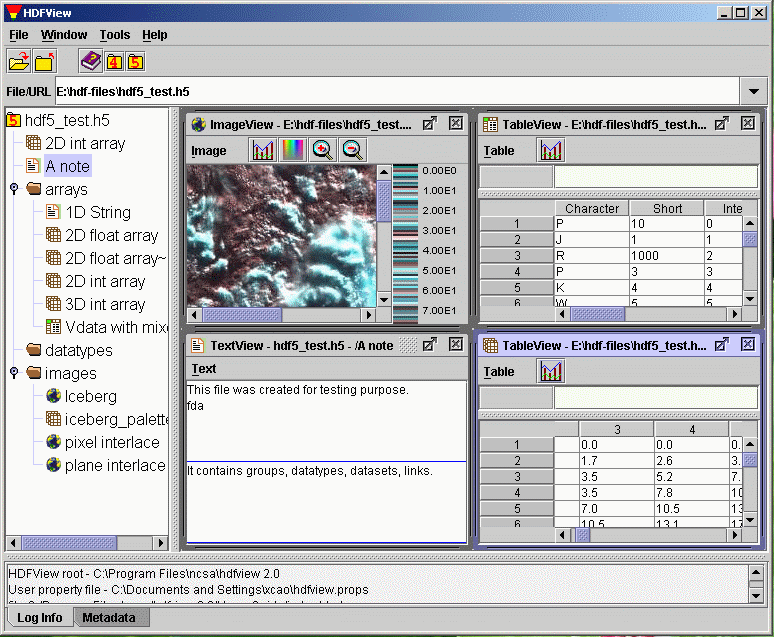 HDF View Version 3.2.0 Free Download 2022
 Download Software For the Linux Grads Version 2.0.1 -2.0.2