set yflip
set yflip on|off
flips the order of the vertical axis. Reset by a clear or set vpage command.
See this article , set xflip


Rotate the axis on the map
set xyrev on|off
Reverses the axes on a plot.
By default for a Z, T plot, the time dimension is plotted horizontally, and the Z dimension is plotted vertically. By setting xyrev, the time dimension would be plotted vertically and the Z dimension would be plotted horizontally. Reset by a clear or set vpage command.
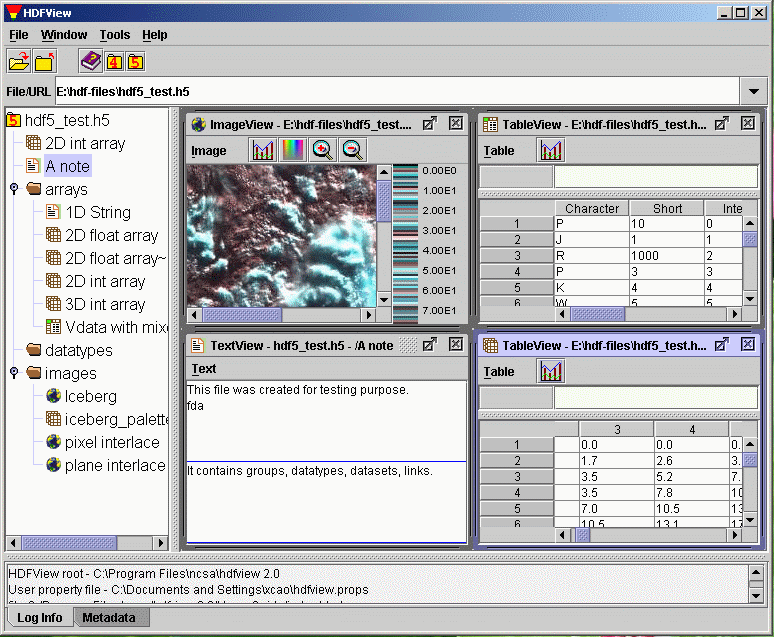
HDFView is an application especially designed to help you handle HDF files in simple manner.
It enables you to explore and edit HDF4 and HDF5 files with the use of a straightforward and user-friendly interface. HDFView allows you to view the complete structure of the file with a correct hierarchy. With it it’s possible to view the embedded data and modify it the way it needs to be.
HDFView provides a well thought out distribution of the workspace. You get three main panels which offer you all that is needed to know about the content of the file. The ‘Tree’ panel supplies the datasets and images that make the HDF format. You are able to view its groups, arrays, committed datatypes and links.
This script, is really more of a function, the best way to use this would be to copy the contents of this script into the bottom of the script you wish to use it in. This function reads in temperature and moisture information and returns a good approximation of both potential and equivalent potential temperature.
This function asks for up to four inputs, though only temperature and moisture inputs are required.
It is capable of calculating equivalent potential temperature given four different moisture input variables:
The default is relative humidity.
draw line x1 y1 x2 y2
Draws a line from x1, y1 to x2, y2 using current line drawing attributes. See the set line command.
d a;b
Color where a<b in white (1) and b>a in red (2).
exp(expr)
Performs the e**x operation, where expr is x. Works on both gridded and station data.
gradsc | gradsnc | gradshdf | gradsdods
GrADS is an interactive desktop tool for the analysis and display of earth science data. GrADS is used worldwide andfreely available over the internet.
GrADS implements two data models: a 5-Dimensional gridded data model, and a station data model. In the gridded data model, the dimensions are presumed to be latitude, longitude, level, time, and ensemble. In the station data model, data exist at arbitrary locations in space and time. Four dimensions (longitude, latitude, level, and time) are used as a framework in the station data model to guide which station reports are to be examined. Each data set is placed within a 4- or 5-Dimensional space by the use of a data descriptor file. Both gridded and station data may be described. Gridded data may be non-linearly spaced; gaussian grids and variable resolution ocean model grids are directly supported. The internal data format in a file may be binary, GRIB1, GRIB2, BUFR, NetCDF, HDF4-SDS, or HDF5.
set lat|lon|lev|time|ens val1 <val2>
This set command sets one dimension of the dimension environment using world coordinates.
q ens
This command returns information about the ensemble dimension. For each ensemble member, the printout includes the index number, ensemble name, length (number of time steps), start time in date format, time axis index of start time, and grib2 codes, if present.
This command is obsolete beginning with grads version 2.1. It has been replaced by gxprint.
enable print fname
This command opens the output file fname that will contain the instructions in grads metacode format to create a hardcopy of the graphical display. Any existing contents of fname will be lost. The output file fname is referred to as a grads metafile.
eloop(expr)
The eloop function is similar to the tloop function. When displaying a grads expression (expr) with the E (Ensemble) dimension varying, the eloop function will evaluate the exprwith each designated ensemble member fixed, then reassemble the grids to obtain a final result that is E-varying. The eloop function is provided as a way to obtain E-varying results from functions or expressions that are unable to operate when E is a varying dimension.
This command sets the thickness for the contour lines.
set cthick thickness
The thickness arg must be an integer in the range of 1 to 12 (or 256 for version 2.1 and later)
The query command allows the user to get information about a variety of aspects of the current grads session. Configuration, plot characteristics, graphics specifics, and file structure are some examples. The use of query pos combined with the coordinate transformations is the basis of many interactive applications with buttons and drop menus. The query command may be shortened to simply q. The syntax is:
q <option>
set cterp on|off
Turns spline smoothing on or off. "Sticks" until reset. Shaded contours are drawn without spline fitting, so to insure an exact match when overlaying contour lines and shaded contours of the same field, specify cterp as off. You can still use the csmooth option, which affects both contour lines and shaded contours.
set cstyle style
Sets the contour linestyle. style options are:
0 - no contours
1 - solid
2 - long dash
3 - short dash
4 - long dash, short dash
5 - dotted
6 - dot dash
7 - dot dot dash
set csmooth on|off
If on, the grid is interpolated to a finer grid using cubic interpolation before contouring. "Sticks".
This section describes some of the grads commands and functions that are available for analyzing and displaying station data. Please refer to the companion section About Station Data for information on the structure of station data files, how to create them, and how to instruct grads to interpret them properly.
Here are some quick links for skipping through this section:
set coslat on|off
Sets scaling of the Latitude dimension to be the cosine of latitude, producing a "crunched" effect near the poles. Will only work for 1-D plots in which Latitude (Y) is the varying dimension. Sticks until reset.
cos(expr)
Takes the cosine of the expr. Values are assumed to be in radians. Works on both gridded and station data.
This function produces a spatial map of temporal correlation coefficients.
This function calculates the spatial correlation between two variables over an X-Y domain. It returns a single number. The syntax is:
(scorr(expr1, expr2, xdim1, xdim2, ydim1, ydim2
The query command allows the user to get information about a variety of aspects of the current grads session. Configuration, plot characteristics, graphics specifics, and file structure are some examples. The use of query pos combined with the coordinate transformations is the basis of many interactive applications with buttons and drop menus. The query command may be shortened to simply q. The syntax is:
const (expr, value, <-u|-a>)
This is a powerful function that allows the user to change the missing values of a variable, set all the non-missing values of a variable to a constant, or set all possible values of a variable (both valid and missing) to a constant.
expr a valid grads expression
value a constant, either an integer or floating point value
-u all missing data are set to value; non-missing data are unchanged
-a all data are set to value, both missing and non-missing
The query command allows the user to get information about a variety of aspects of the current grads session. Configuration, plot characteristics, graphics specifics, and file structure are some examples. The use of query pos combined with the coordinate transformations is the basis of many interactive applications with buttons and drop menus. The query command may be shortened to simply q. The syntax is:
q <option>
If the readline library compiles on your system then the default prompt will be ga-> as opposed to ga>. This indicates that command line editing is active. The library defaults toemacs mode but can be set up to run using vi syntax.
Here's a list of the commands which may typically be used:
ctrl-a go to beginning of line
ctrl-e go to end of line
ctrl-f go forward one char
ctrl-b go backward one char
ctrl-d delete the char
ctrl-p recall previous line
ctrl-n recall next line
ctrl-r reverse search
This function creates a grid from a collection of station data. The syntax is:
(<coll2gr(cnum <,num
cnum collection number
num number of vertical levels in the output grid (default is 10)
This command provides a way for station data profiles and time series to be saved in memory as a set. The command format is:
collect cnum expr
set cmin value
Contours not drawn below this value. Reset by clear or display.
تعداد صفحات : 4


 set yflip Flips the order of the vertical axis
 Download Software For the Linux Grads Version 2.0.1 -2.0.2